Free
€0
For light use
Get Started for Free- 500 MCP calls a month per Zendesk account
- Shared by everyone on your Zendesk
- No credit card required

Automation Apps
Merge Zendesk TicketsMerge Freshdesk TicketsAuto Remove AttachmentsTicket ClassificationDocument Parser OCRTicket Parser AutofillZendesk ChatGPT AutomationHelp Center Apps
Help Center ManagerHelp Center Translate for ZendeskHelp Center Translate for IntercomHelp Center AnalyticsHelp Center ExportMacro ExportAssist Apps
Agent Co-writerTranslate ConversationsMCP Server for ZendeskAdvanced Search PlusArticles PDF ExportConnect Claude, ChatGPT and other MCP-compatible AI assistants to your Zendesk account. Ask for a weekly KPI report, a trend analysis or a QA review of last month's tickets, and the answer comes from your live Zendesk data. If you allow it, your assistant can also reply to and create tickets, draft Help Center articles and curate macros.
Free for 500 calls a month per Zendesk account. No credit card required.
❤️ by customers and rated ⭐⭐⭐⭐⭐ on Zendesk Marketplace
Trusted by
Join companies who use Swifteq to scale support without adding headcount.





MCP (Model Context Protocol) is an open standard that lets AI assistants use real tools and real data. Swifteq's MCP Server is the bridge between your AI assistant and Zendesk: instead of pasting ticket exports into a chat, your assistant asks Zendesk directly, in real time, with the Zendesk permissions of the person using it.
It is a third-party app by Swifteq, listed on the Zendesk Marketplace. It is not an AI model: the answers come from the assistant you connect, such as Claude or ChatGPT. Swifteq runs no model and keeps no copy of your tickets.
Ask in plain language and your assistant picks the right tools. These are the jobs teams use it for most.
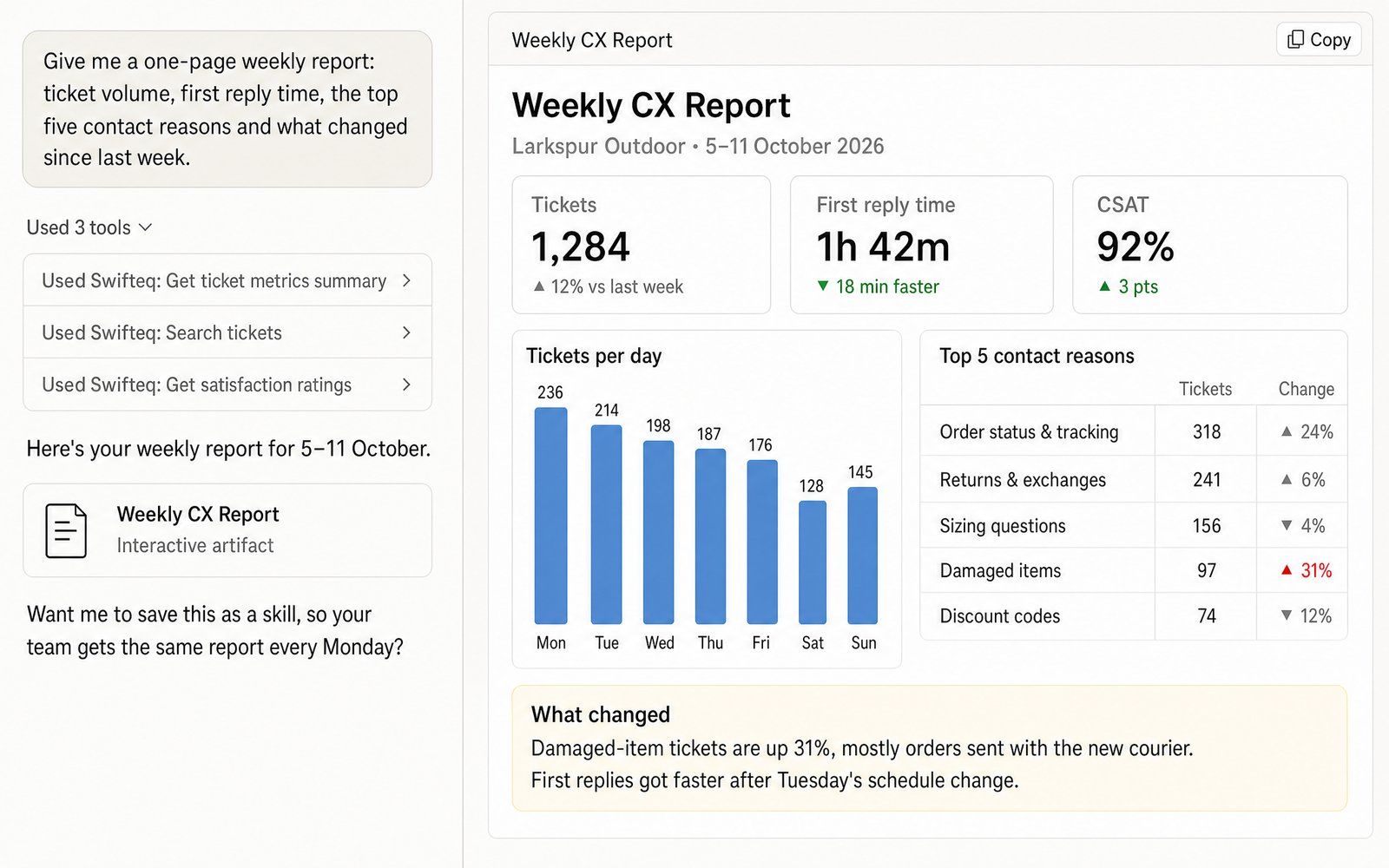
Describe the report you've always wanted, in plain words, and your assistant builds it from your live Zendesk data. Choose the metrics that matter to you, then add what a standard report can't show: why customers got in touch, what they said in their satisfaction comments, and how it all looks across tickets, users and organizations. For example, resolution times and CSAT for your largest customers only.
Make it a one-page summary for leadership or a live dashboard for the team. Once it's right, turn it into a Claude skill, so you and your team get the same report from a single prompt.
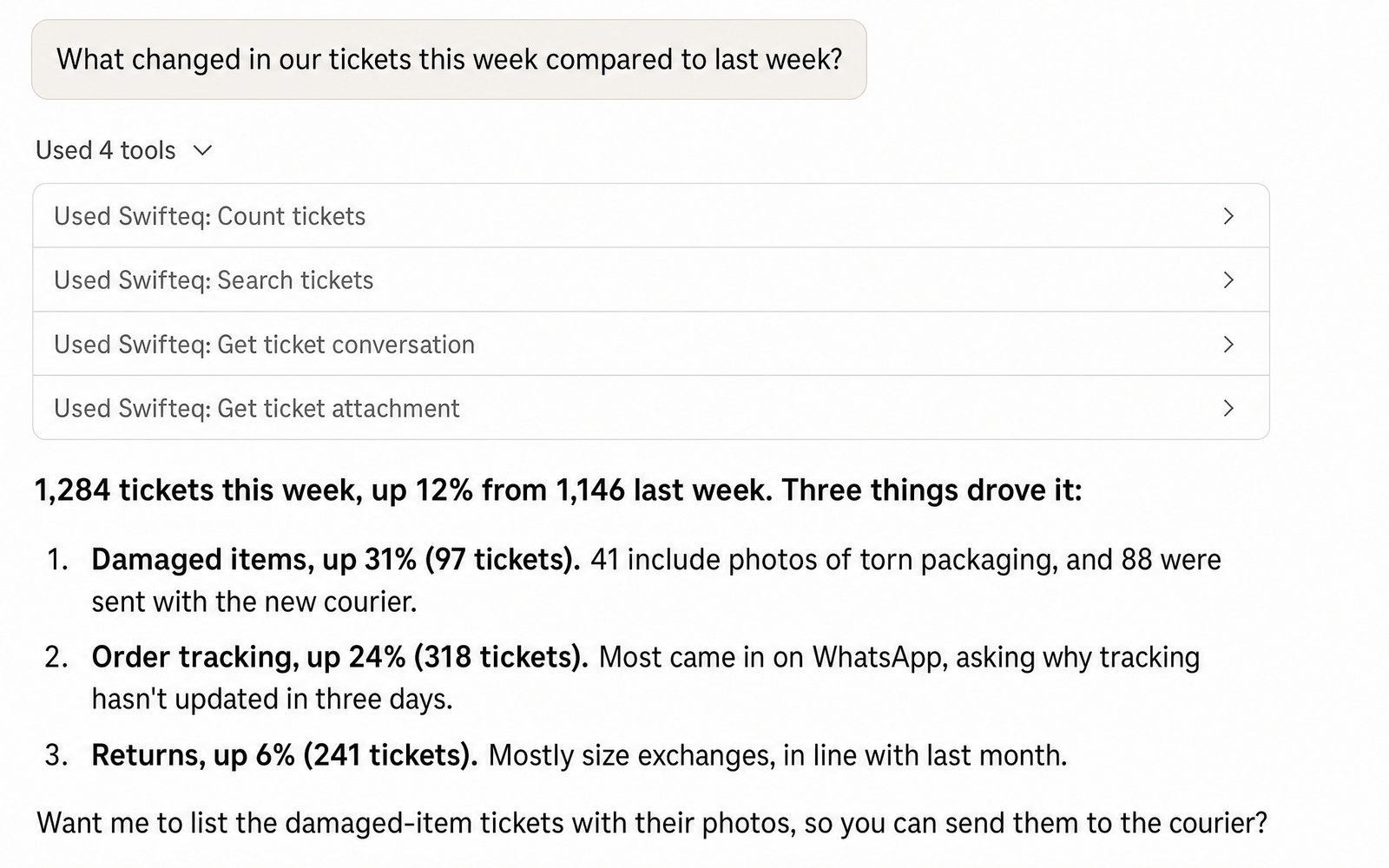
Ask what's going on in your queue and your assistant reads the tickets for you: full conversations, attachments and screenshots, from email, messaging or WhatsApp. It finds the patterns behind the numbers, from recurring issues to the customers who raise them.
Use it for a weekly trend check, a deep dive after a spike, or a QA review of last month's closed tickets.
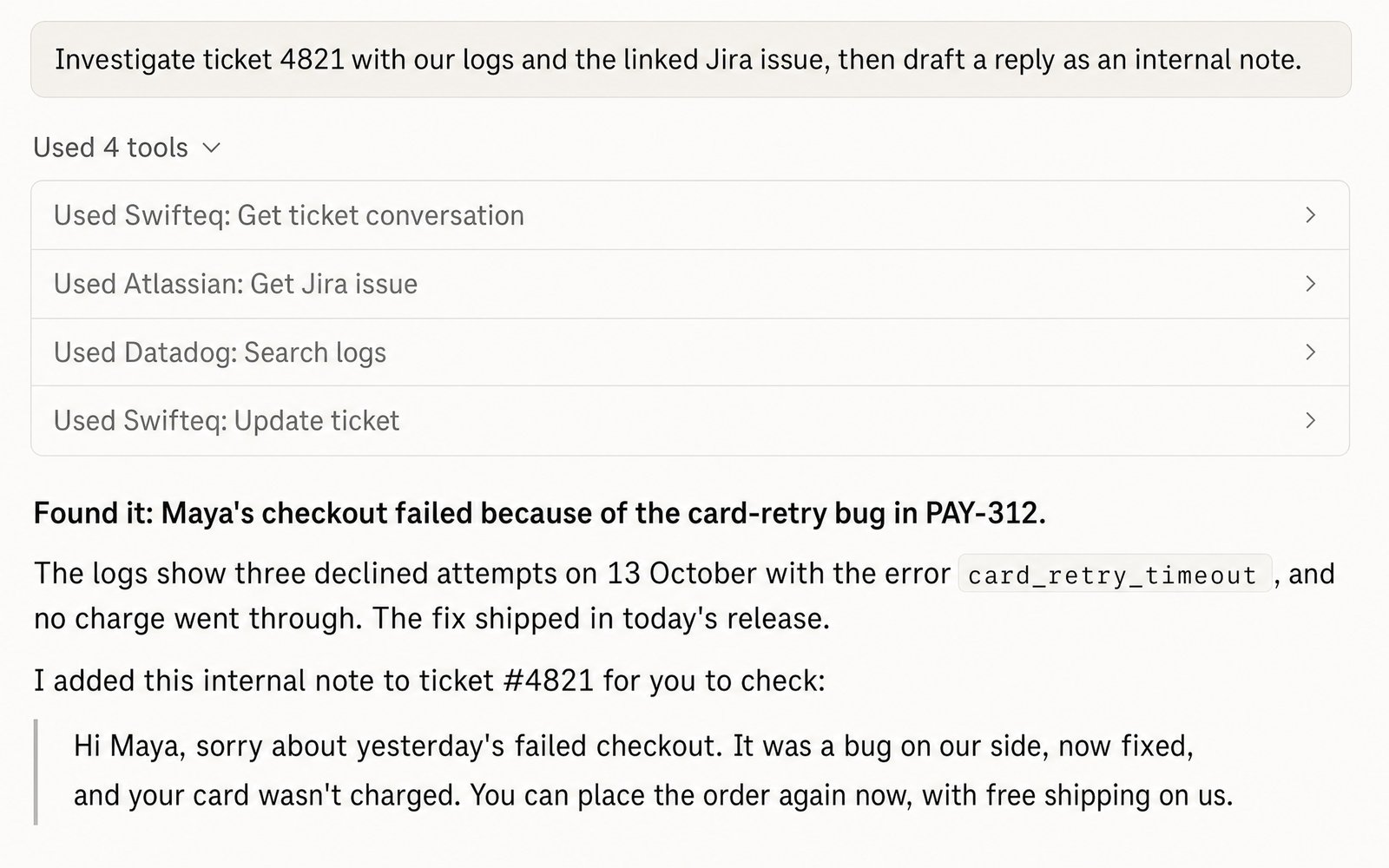
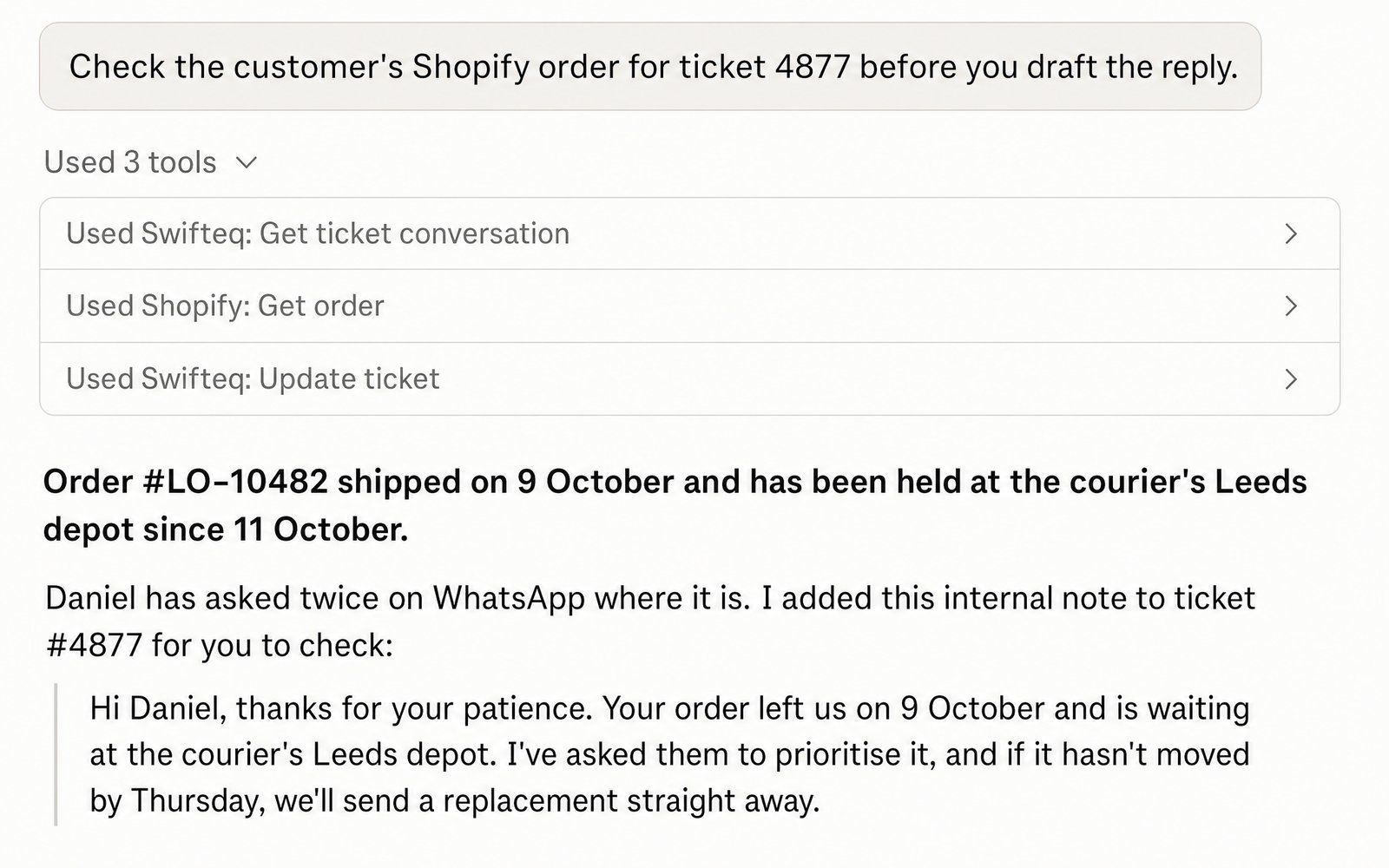
When you allow changes, your assistant works the queue with you: it drafts replies as internal notes for you to check, updates fields and tags, creates tickets, and links reports of the same issue to one problem ticket. Public replies stay off until an account owner turns them on, and nothing can be deleted.
Connect it alongside your codebase, Jira, production logs and account data, and your assistant can find the cause of a customer's problem before it writes the reply.
Find the questions your agents answer again and again with no article to point to, and let your assistant draft the missing ones in your house style, across every brand's Help Center.
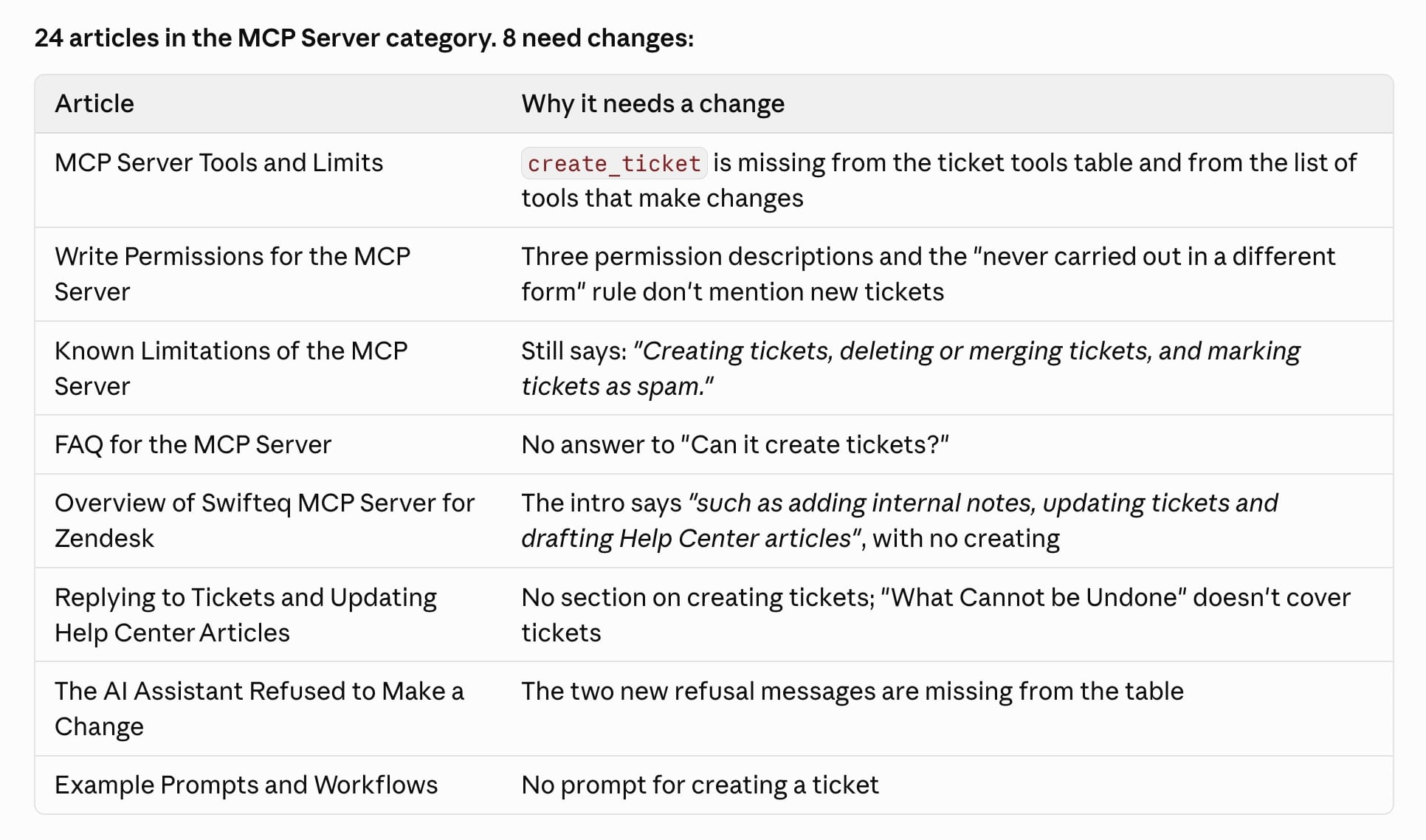
After a release, it reviews which articles are out of date and drafts the changes. In Claude Code it can retake the screenshots too, and once you approve, it publishes the updates. That's how we keep our own Help Center current.
Your assistant finds the macros agents actually use, spots the ones that overlap or are out of date, and suggests better wording. With macro changes allowed, it can update them, create new ones or switch old ones off.
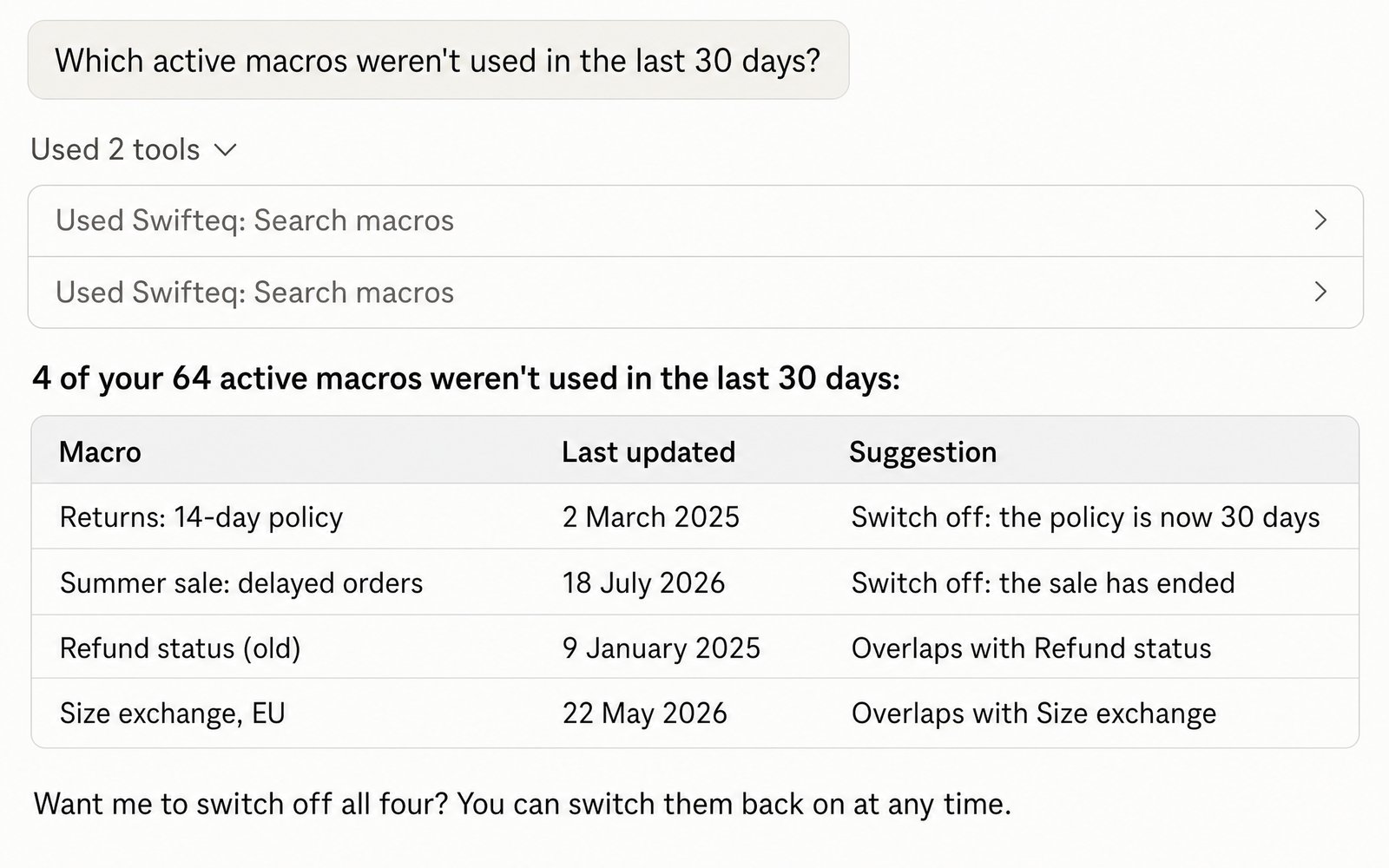
In the same chat, your assistant can use Zendesk alongside your other tools, such as Jira, GitHub, Shopify or Slack. Teams also build it into their own agents and automations, with Copilot Studio, n8n or their in-house AI platform.
Look up users and organizations with their custom fields, such as an account ID, plan or ARR, and pull them alongside the tickets in the same request.
Read CSAT ratings and comments, from legacy ratings or the newer surveys, to see what is behind a bad week. Zendesk limits CSAT to admins.
List triggers with their usage, ticket fields, forms and brands, and find agents by name.
Product managers, leadership, technical writers and account managers can ask support data their own questions, in the AI assistant they already use, without a Zendesk seat.
Any AI assistant that supports MCP with OAuth sign-in can connect. These are the ones we test:
| AI assistant | Status | What you need |
|---|---|---|
| Claude (web and desktop) | Supported | A paid Claude plan (Pro, Max, Team or Enterprise). Setup guide |
| Claude Code | Supported | The OAuth callback port set to 8080. Setup guide |
| ChatGPT | Supported | Plus, Pro, Business or Enterprise, with Developer mode on. Setup guide |
| Cursor | Works | Email us so we can allow its callback URL. |
| VS Code and GitHub Copilot | Works | Enter the OAuth client ID by hand. |
| Microsoft Copilot Studio | Works | Use the built-in MCP wizard, not a custom connector. |
| n8n, LibreChat and your own MCP clients | Case by case | MCP with OAuth sign-in. Email us the callback URL. Setup guide |
How it works
Sign up and authorize your Zendesk account. Choose read only, or read and write if you want your assistant to make changes.
In Claude or ChatGPT, add a custom connector with the URL https://mcp.swifteq.com/api/mcp/mcp and sign in with your Swifteq account.
For example: “How many tickets did we get last week, and what were the top five reasons?” Invite teammates when you are ready: each one connects their own Zendesk login.
The answers to what your security team will ask.
Teammates connect their own Zendesk login by default, so their role, groups and Private Groups apply, and their changes are attributed to them in Zendesk.
Write access is chosen when you authorize Zendesk. Public replies, publishing articles, changing users and organizations, and changing macros each stay off until an account owner turns them on, for everyone or for one person.
There are no delete, merge or spam tools. A refused action is never done another way: if public replies are off, nothing is posted.
Data is fetched from Zendesk when your assistant asks, passed to it, and discarded. Swifteq runs no AI model and does not train on your data.
Hosted on AWS in Ireland. Swifteq holds SOC 2 Type 2 certification and our standard DPA applies. Reports are in our Trust Center.
OAuth 2.0 with PKCE for your assistant and Zendesk's own OAuth for your account, so there are no API keys to share. A static IP address is available for Zendesk IP allowlists.
Customers
“This is a great MCP server. It perfectly and simply does what we need it to do. Total Game Changer for our workflow, worked perfectly and we are now expanding our use of it.”
“Works great! Total game changer for handling support. Recommend this for everyone that uses Zendesk.”
“The MCP Server has been very useful, allowing us to pull Zendesk tickets for external analysis and the tracking of incident vs device register. Integrates very easily with Claude and functionality has been great.”
One plan for your whole team: €49 a month covers your account and its first user, and each extra user is €9 a month. A team of 10 pays €130 a month.
€0
For light use
Get Started for Free€49/month
For your account and its first user, then €9 a month per extra user
Get Started€490/year
For your account and its first user, then €84 a year per extra user
Get StartedThe free allowance is per Zendesk account, shared by everyone at your company who connects to it, and resets on the 1st of each month. Prices are in euro, and VAT is added where it applies. How pricing works.
No. It is built by Swifteq, an independent company in Dublin, Ireland, that has made Zendesk apps for several years, and it is listed on the Zendesk Marketplace. Zendesk has announced an MCP server of its own. Both use the same protocol, so your assistant can connect to either, or to both.
Claude (web, desktop and Claude Code) and ChatGPT are supported, and Cursor, VS Code with GitHub Copilot and Microsoft Copilot Studio work too. Other assistants work if they support MCP with OAuth sign-in.
With write access, it can add internal notes and replies, update ticket fields, tags and CCs, create tickets, link incidents to a problem ticket, draft and update Help Center articles, add people to organizations, and apply or edit macros. It cannot delete or merge anything. Public replies, publishing articles, user and organization changes and macro changes each need an account owner to turn them on. See Write permissions.
No. Ticket content, conversations, attachments and customer records are fetched from Zendesk when your assistant asks and are not kept. What we keep is your account email, any feedback you choose to send us, and infrastructure logs with request details such as search terms, but no ticket content. See Security and data handling.
It works with Zendesk Support and Zendesk Suite. Admins and agents get full use. Light Agents can connect, read what their role allows and add internal notes, but Zendesk stops them replying publicly, changing ticket fields or reading CSAT. Ticket search uses a Zendesk API that some smaller plans limit, and macro usage counts need Professional or Suite Growth and above.
One tool call. If your assistant searches tickets and then opens three of them, that is four calls. Failed calls are not counted, and checking your usage does not count either.
Per Zendesk account. Everyone at your company connecting the same Zendesk shares one allowance, whether you are on one Swifteq account or several.
No. The free tier covers 500 calls a month, which is more than three quarters of users make. To see where you stand, ask your AI assistant “what’s my Swifteq MCP usage?”.
Calls return a clear message with your usage and a link to upgrade. Nothing is deleted, and nothing is charged automatically. The allowance resets on the 1st of each month.
Yes, and it is cheaper. The account owner invites colleagues as users at €9 a month each (€84 a year on the annual plan), and each one connects their own Zendesk login, so their own Zendesk permissions apply. If each person keeps their own account instead, each of those accounts needs its own €49 plan once the shared allowance is used up. For a team of ten that is €130 a month on one account against €490 on ten.
Email support@swifteq.com and tell us which account should be the main one, and we will merge them for you.
Not today. OAuth sign-in is the only supported method.
Not today. If that is a hard requirement for you, email support@swifteq.com and tell us what is driving it.
From the billing page in your account, any time. It stops at the end of the period you have paid for.

Free for 500 calls a month. No credit card required.
Also from Swifteq
Zendesk Automation Apps

Write replies, summarize long tickets and translate messages without leaving Zendesk, in your brand's tone and with your Help Center built in. Pricing starts at $9/agent/month.

Localize your Zendesk Help Center with AI. Auto-translate articles to and from any modern language, while keeping the same formating. Pricing starts at €79/month.
Page last updated